ERC-721 Redeem Minter
Distribute governance tokens to holders of an existing NFT collection
Section titled “Distribute governance tokens to holders of an existing NFT collection”Nouns Builder supports two custom minter contracts that allow a DAO to distribute governance tokens to holders of a pre-existing NFT collection, rather than (or in addition to) the standard auction mechanism. Both contracts live in the nouns-protocol repository.
| Minter | UI Support | Use Case |
|---|---|---|
ERC721RedeemMinter | ✅ Supported | Redeem DAO tokens 1:1 to holders of a specific ERC-721 NFT collection |
MerkleRedeemMinter | ❌ Not supported — contact the team | Distribute tokens based on a merkle allowlist |
Step 1: Reserve Tokens During DAO Creation
Section titled “Step 1: Reserve Tokens During DAO Creation”This must be done before deploying the DAO.
During the DAO creation flow on nouns.build:
- Navigate to the Rewards & Allocations step
- Open the Advanced Settings toggle
- Find the section labelled Reserve Tokens for Airdrops or Manual Mints
- Enter the number of tokens to reserve in the
Reserve Tokens Untilfield (e.g.202if your presale had 202 NFTs)
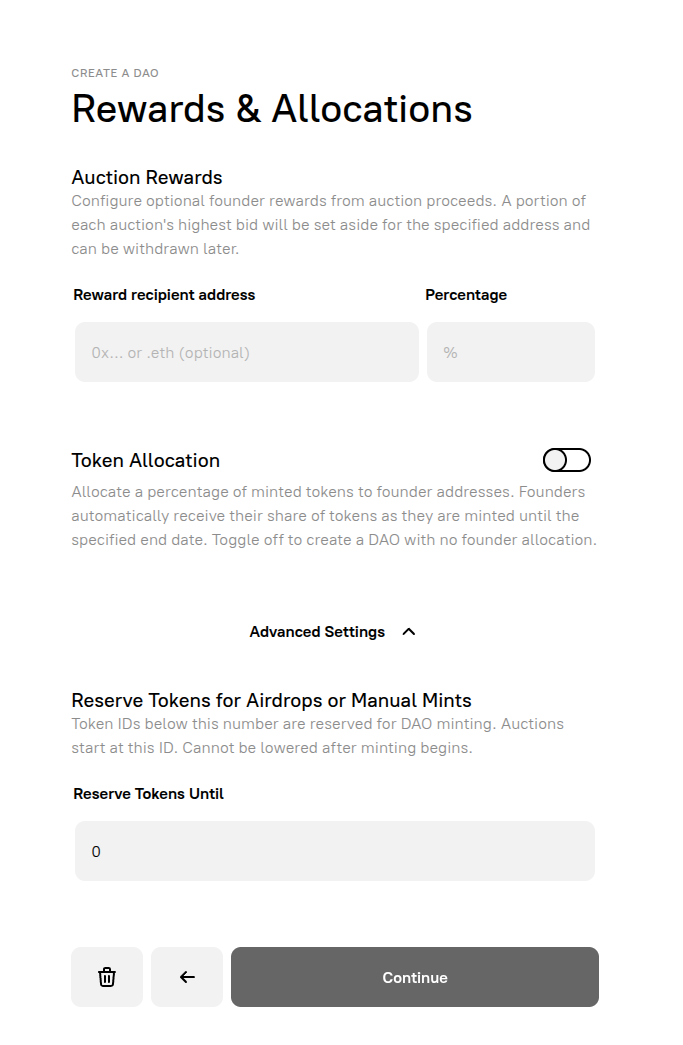
The helper text reads: “Token IDs below this number are reserved for DAO minting. Auctions start at this ID. Cannot be lowered after minting begins.”
Other settings on this screen
Section titled “Other settings on this screen”- Auction Rewards — optionally set aside a percentage of each auction’s highest bid for a specified address. This is separate from token allocation.
- Token Allocation — allocate a percentage of minted tokens to founder addresses. Toggle off to create a DAO with no founder allocation. Note: you cannot fully remove the founder entry — set the percentage to
0with a short end date if you want no allocation.
Step 2: Manage Minters
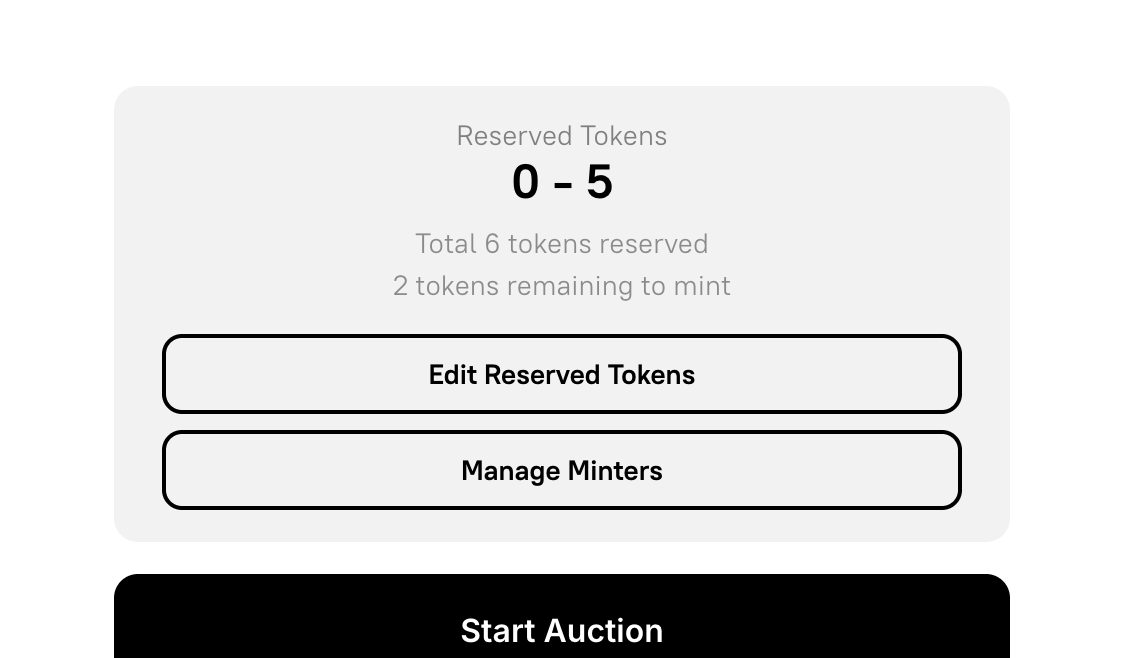
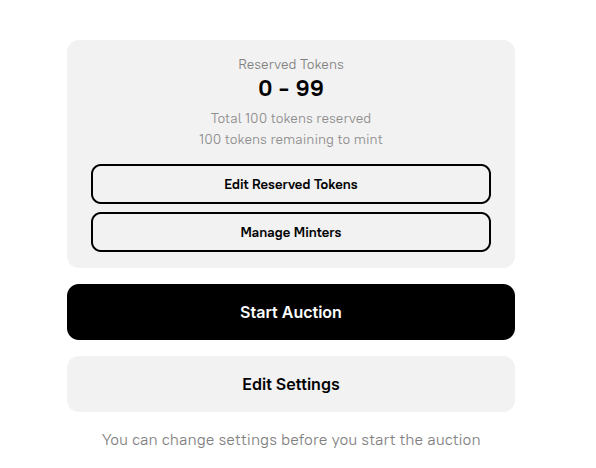
Section titled “Step 2: Manage Minters”After deploying the DAO, go to your DAO’s admin panel on nouns.build. You will see:
- Reserved Tokens range (e.g. 0–5)
- Total tokens reserved and tokens remaining to mint
- Edit Reserved Tokens — adjust the reserved count post-deployment
- Manage Minters — open the minter management interface
- Start Auction — begins the standard auction mechanism
Manage Minters modal
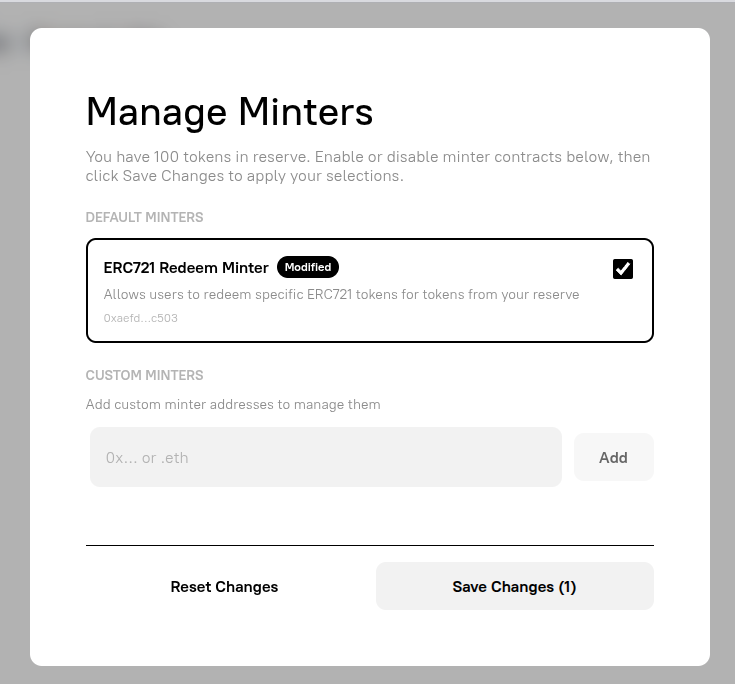
Section titled “Manage Minters modal”Click Manage Minters to open the modal. The header confirms how many tokens are in reserve (e.g. “You have 100 tokens in reserve.”).
Default Minters
ERC721 Redeem Minter— check this box to enable it. Description: “Allows users to redeem specific ERC721 tokens for tokens from your reserve.” The contract address is shown below the label.
Custom Minters
- An address input field (
0x…or.eth) where you can add any minter contract address manually — for example, your own wallet if you want to mint token #0 yourself, or theMerkleRedeemMinteraddress if setting it up manually.
Click Save Changes to apply. This calls updateMinters on the token contract, whitelisting the selected contracts.
Step 3: Configure Mint Settings
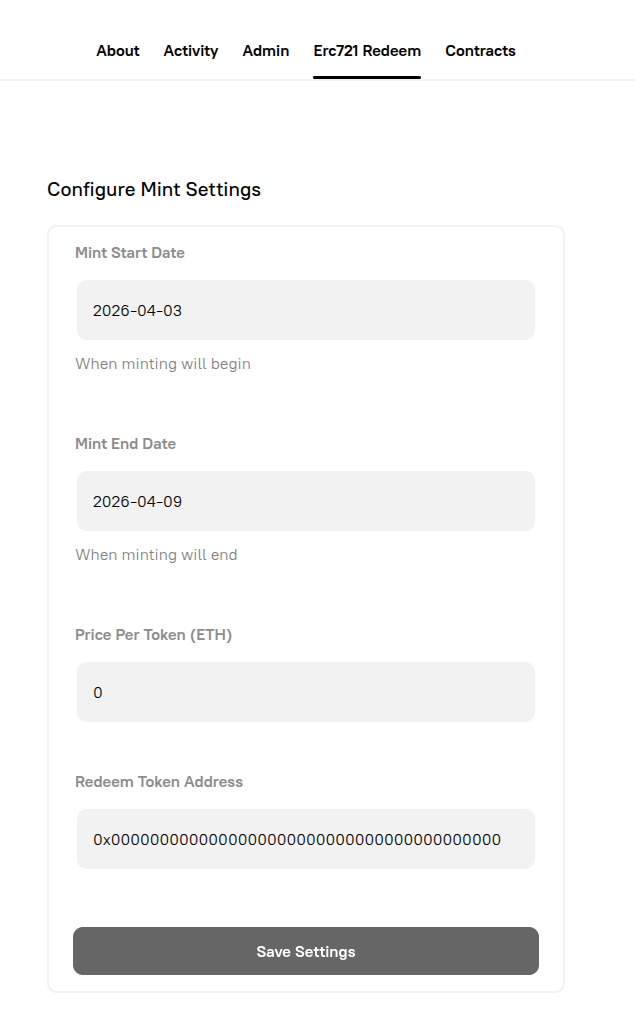
Section titled “Step 3: Configure Mint Settings”Once you enable the ERC-721 Redeem Minter and save, a new Erc721 Redeem tab will appear in your DAO’s navigation alongside About, Activity, Admin, and Contracts.
Click the tab to open the Configure Mint Settings form:
| Field | Description | Example |
|---|---|---|
Mint Start Date | When minting becomes available | 2026-04-03 |
Mint End Date | When minting closes | 2026-04-09 |
Price Per Token (ETH) | Cost to redeem; set to 0 for a free airdrop | 0 |
Redeem Token Address | Contract address of the source NFT collection | 0x000…000 |
Click Save Settings to write the configuration on-chain.
Step 4: Mint Tokens
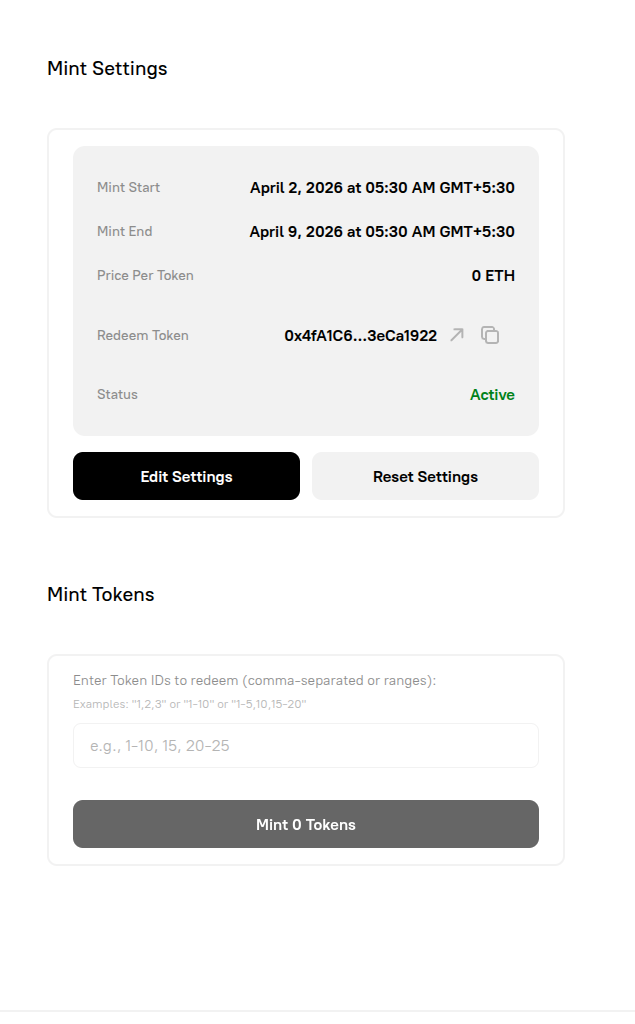
Section titled “Step 4: Mint Tokens”After saving settings, the tab displays a Mint Settings summary:
- Mint Start / Mint End — timestamps for the active window
- Price Per Token —
0 ETHfor a free airdrop - Redeem Token — the source NFT collection address (with link and copy icons)
- Status — shown as
Activein green when within the mint window - Edit Settings and Reset Settings buttons
Below the summary is the Mint Tokens section:
- An input field: “Enter Token IDs to redeem (comma-separated or ranges)”
- Supported formats:
1,2,3or1-10or1-5,10,15-20 - A Mint X Tokens button that updates dynamically as you enter IDs
Enter the token IDs of the presale NFTs you want to redeem. The minter looks up the current holder of each token ID in the source collection and mints the corresponding DAO token to that wallet. You can execute this on behalf of all holders — holders do not need to take any action themselves.
Step 5: Start Auctions
Section titled “Step 5: Start Auctions”Once the reserve tokens have been redeemed, return to the DAO admin panel and click Start Auction to begin the standard auction mechanism for remaining tokens.
Manual Path via Block Explorer
Section titled “Manual Path via Block Explorer”If the UI is unavailable or you need more control, all of the above can be done directly on Basescan.
Verifying contracts as proxies
Section titled “Verifying contracts as proxies”The DAO deploys 5 contracts (token, auction, governor, treasury, metadata). None show callable functions by default on Basescan because they are proxy contracts. To expose them:
- Go to the contract on Basescan
- Click the three dots (⋯) → Is this a proxy?
- Confirm — this unlocks Read as Proxy and Write as Proxy tabs
- Repeat for each of the 5 DAO contracts
Key contract calls
Section titled “Key contract calls”On the Token Contract:
| Function | Parameters | Purpose |
|---|---|---|
updateMinters | [(minterAddress, true)] | Whitelist the ERC721RedeemMinter (or your own wallet) as an allowed minter |
mintFromReserveTo | (to: yourAddress, tokenId: 0) | Manually mint a specific reserve token to an address |
On the ERC721RedeemMinter Contract:
Configure settings with the equivalent of the UI form (mintStart, mintEnd, pricePerToken, redeemToken, tokenContract), then call the redeem/mint function passing an array of presale token IDs.
Token ID Mapping
Section titled “Token ID Mapping”Reserve token IDs in the DAO map directly to the token IDs of the source collection:
- DAO token
#0→ presale token#0 - DAO token
#1→ presale token#1 - and so on
If your presale collection starts at ID #1 (common on Highlight.xyz), then DAO token #0 has no corresponding presale holder. In that case you can either leave it unclaimed, or manually mint it via mintFromReserveTo after adding your own wallet address under Custom Minters in the Manage Minters panel (or via the contract directly).
Troubleshooting
Section titled “Troubleshooting”| Issue | Resolution |
|---|---|
| ”Manage Minters” buttons don’t respond | Ensure your wallet (e.g. Rabby) is unlocked. A locked wallet causes silent failures. Hard refresh after unlocking. |
| Connected to wrong chain | Confirm your wallet is on the correct chain (Base mainnet or Base Sepolia for testnet). A chain mismatch causes calls to fail silently. |
| Can’t see the Manage Minters / reserved tokens UI | Navigate to the DAO admin panel. If using testnet, ensure you’re on testnet.nouns.build. |
| Redeem tab disappears after auctions start | Expected behaviour. Use the manual contract path on Basescan to complete any remaining redemptions. |
MerkleRedeemMinter not in the UI | Contact the Nouns Builder team — this must be set up manually. |
Summary Flow
Section titled “Summary Flow”DAO Creation└─ Rewards & Allocations → Advanced Settings└─ Set "Reserve Tokens Until" (e.g. 202)↓Post-Deployment (before starting auctions)└─ DAO Admin Panel → Manage Minters└─ Check "ERC721 Redeem Minter" → Save Changes↓"Erc721 Redeem" tab appears in DAO navigation└─ Configure Mint Settings(dates, price=0, redeem token address) → Save Settings↓Mint Tokens└─ Enter token IDs (comma-separated or ranges) → Mint X Tokens↓Start Auction