ERC-721 Drop Proposal (Droposal)
Overview
Section titled “Overview”A droposal is an ERC-721 Drop Proposal — an on-chain DAO proposal that, if passed, deploys a new NFT collection contract and makes it available for public minting. The contract is based on Zora’s ERC721Drop standard.
Builder has reinstated legacy support for droposals alongside the launch of the coining feature. This means:
- Standalone mint pages are available for every droposal, allowing creators to share a direct minting link with their audience.
- Droposals appear in the DAO Gallery tab, tagged with a Drop badge, so they remain discoverable alongside other DAO content.
New droposals can still be created via the Droposal: Single Edition transaction type in the proposal builder.
Standalone Mint Page
Section titled “Standalone Mint Page”Every droposal has a dedicated public mint page at: nouns.build/drop/[chain]/[contractAddress]
This page shows the collection media, title, creator, price, and a Mint button. Share this URL directly with your audience — no DAO interface or governance knowledge is required to mint.
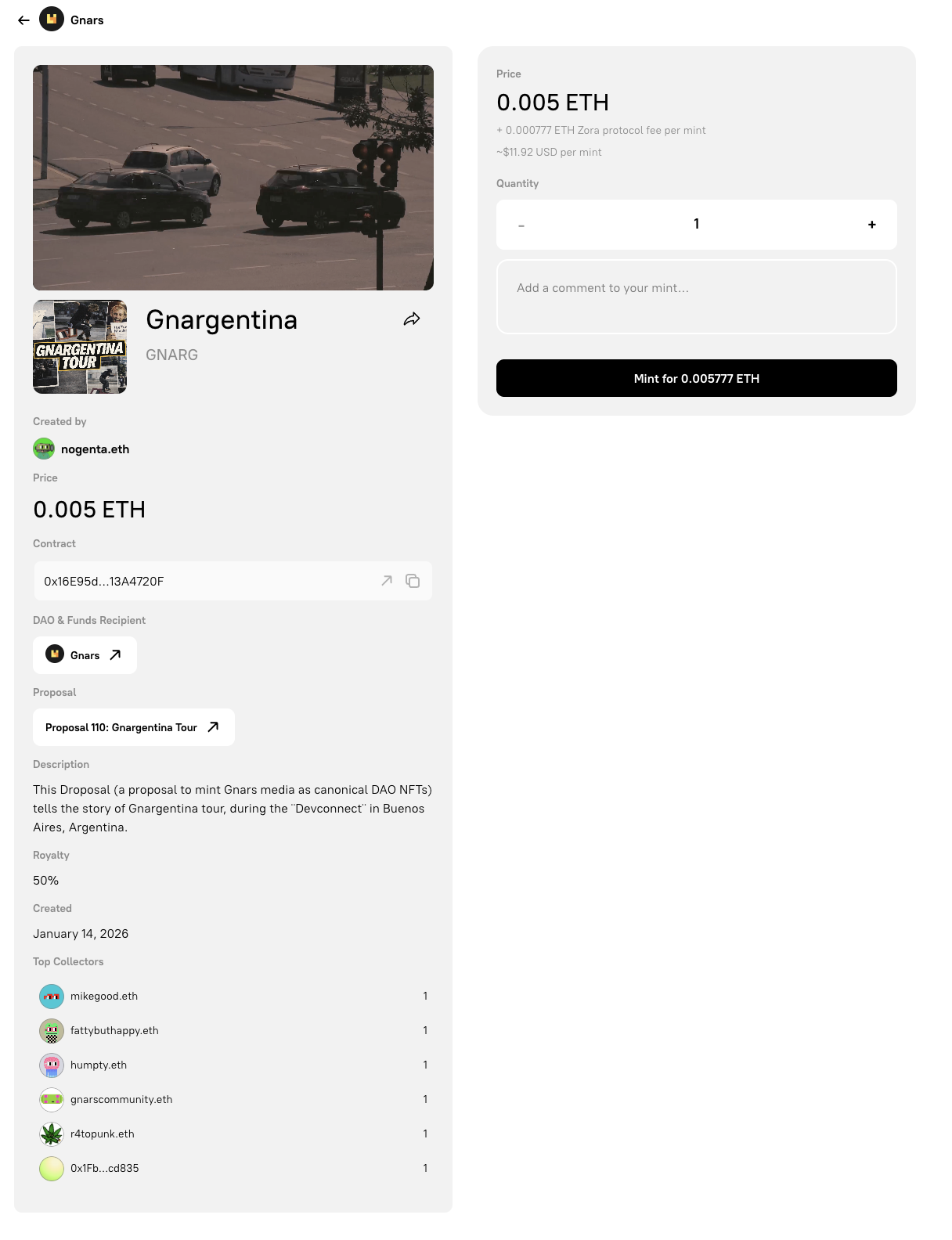
The standalone droposal mint page. Share this URL directly with your audience so they can mint without interacting with the DAO governance interface.
Droposals in the DAO Gallery
Section titled “Droposals in the DAO Gallery”Droposals appear in the Gallery tab of any DAO that has created them. Each droposal card is labelled with a Drop badge in the top-right corner to distinguish it from other gallery content types.
Visitors can mint directly from the gallery card without leaving the DAO page, or click through to the full standalone mint page.
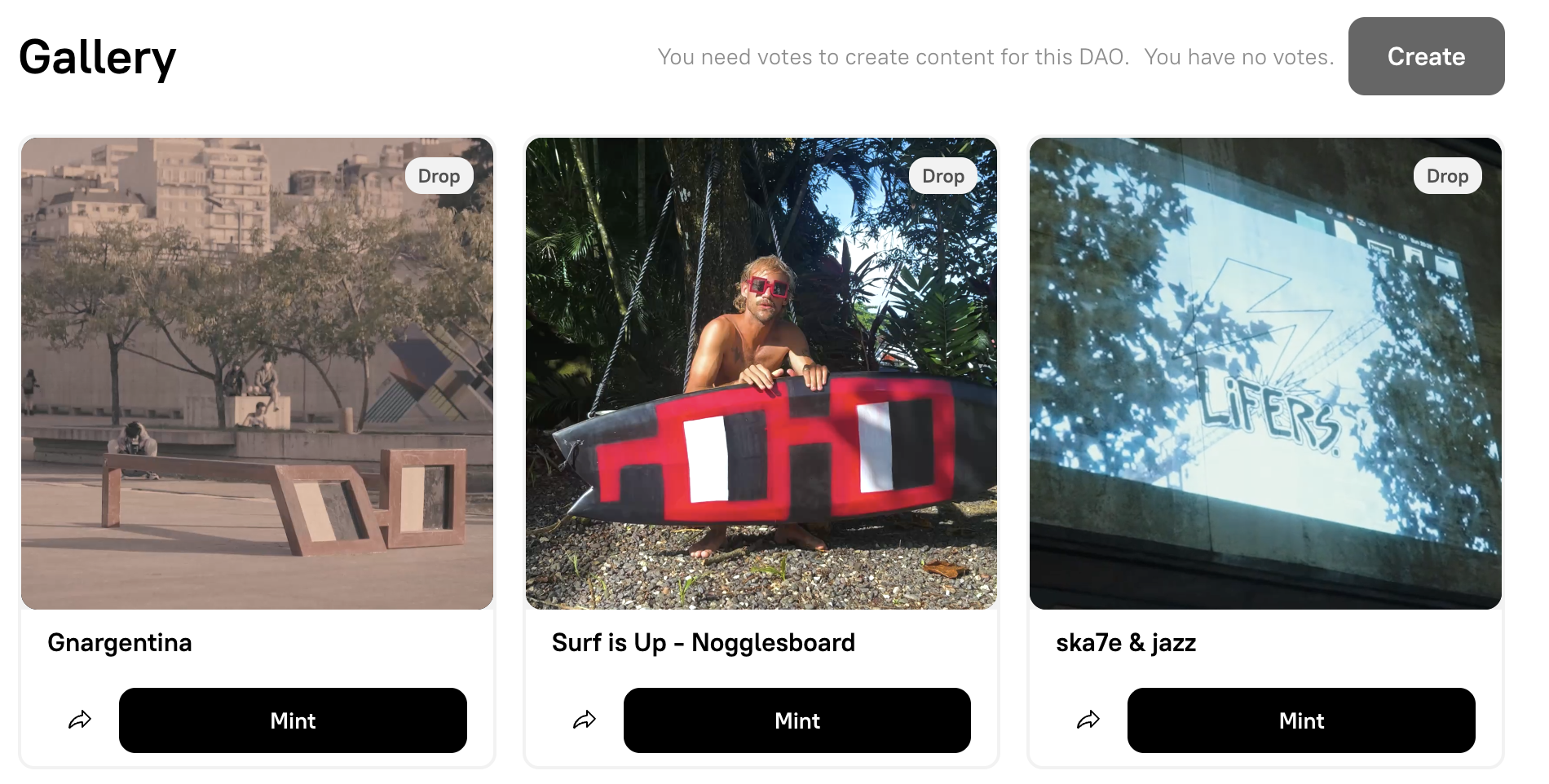
The DAO Gallery tab. Droposals are marked with a Drop badge and include a Mint button directly on the card.
Creating a Droposal
Section titled “Creating a Droposal”To create a new droposal:
- Navigate to your DAO’s dashboard and click Create Proposal.
- Write a proposal title and description explaining the drop.
- On the Add Transactions step, select Droposal: Single Edition from the transaction type dropdown.
- Configure the drop settings (see Sales Configuration below).
- Add the transaction to the queue, then review and submit the proposal for a governance vote.
- If the proposal passes and is executed, the
ERC721Dropcontract is deployed and the mint page becomes active.
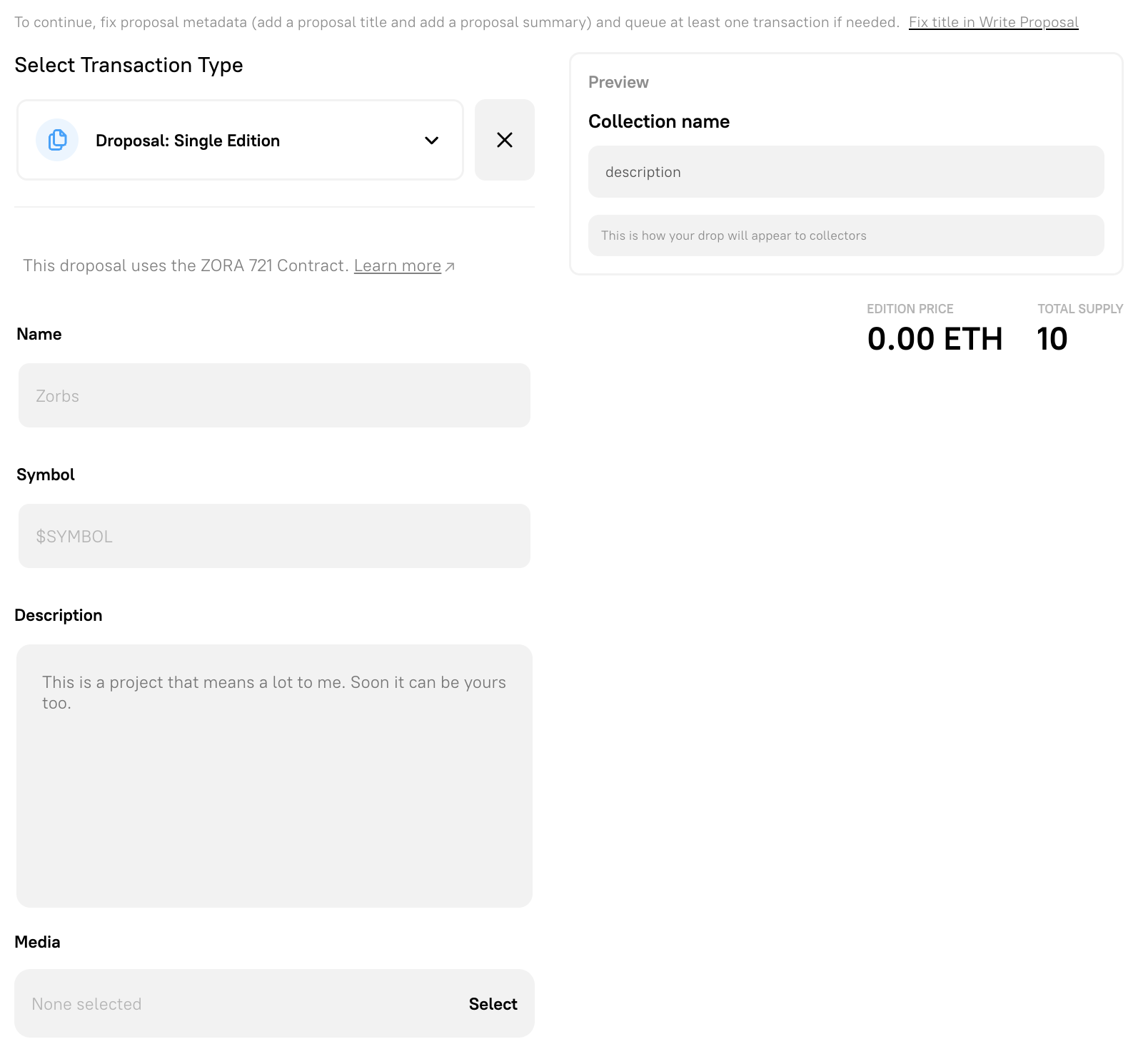
Select Droposal: Single Edition from the transaction type dropdown on the Add Transactions step.
You can then also define edition parameters and set a royalty payout address.
Droposal Edition Parameters
Section titled “Droposal Edition Parameters”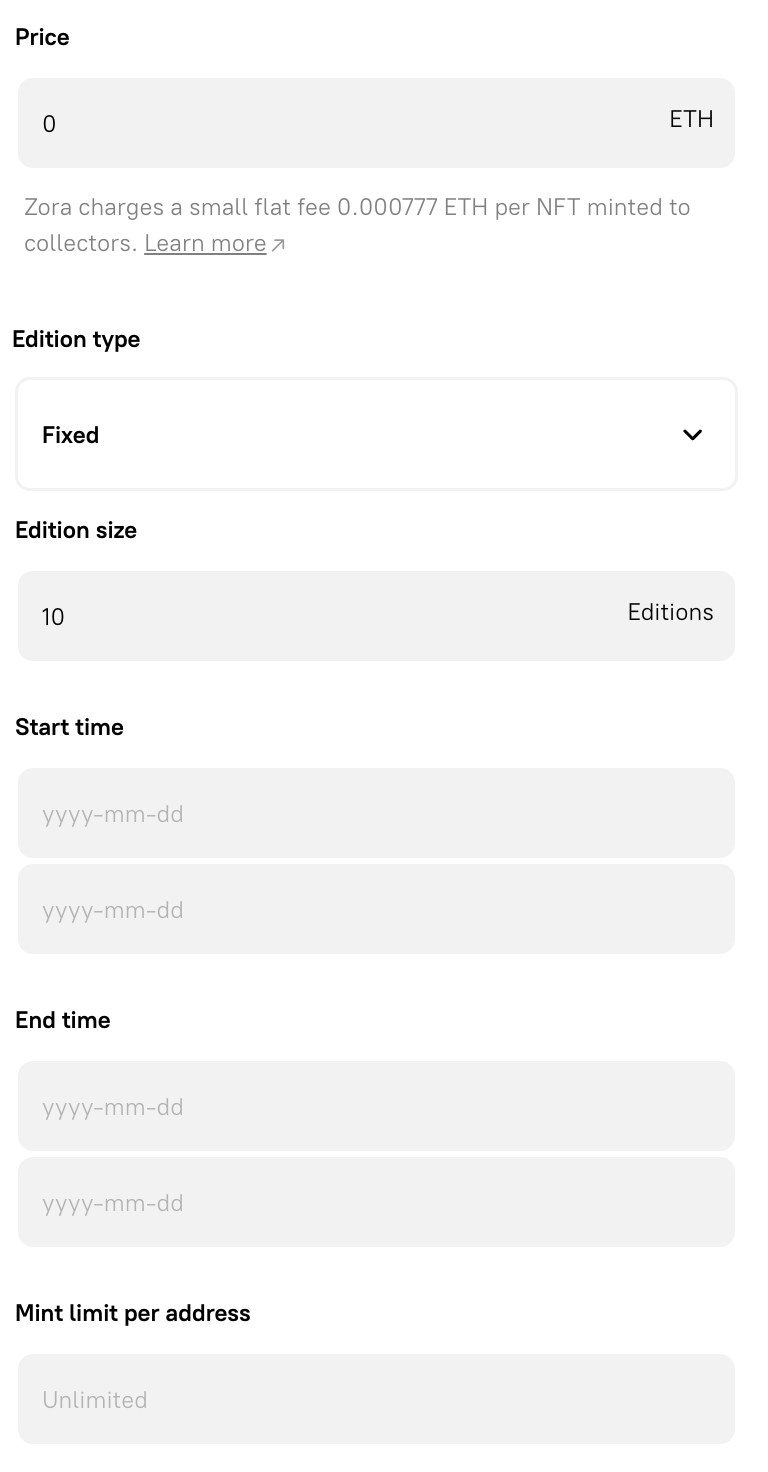
Droposal Royalties Payout Address
Section titled “Droposal Royalties Payout Address”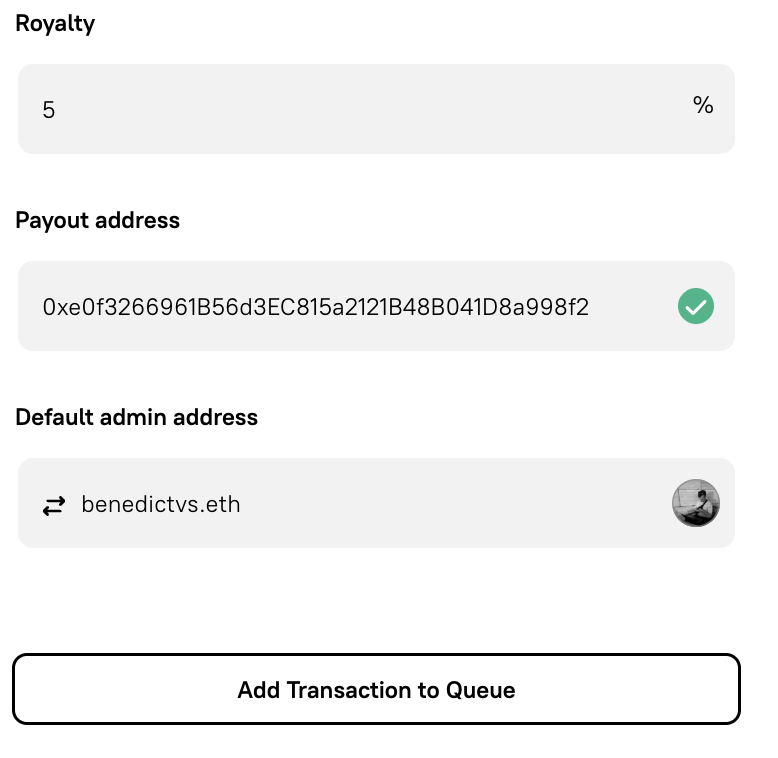
Technical Reference
Section titled “Technical Reference”The following section covers the ERC721Drop contract standard used by droposals. This is adapted from Zora’s archived documentation.
Contract Types
Section titled “Contract Types”NFT contracts created from the ZoraNFTCreator are known as ERC721Drop contracts. Each drop contract is cloned from an implementation address and receives its own address. Both Editions and Drops use the same base contract but have different metadata rendering contracts.
Every time an NFT is minted and sold using these contracts, 5% of the primary sale amount is reserved by the Zora DAO. Nothing is taken on secondary sales.
Edition: A collection where all NFTs share the same media asset.Drop: A collection where each NFT has its own individual media asset.
Sales Configuration
Section titled “Sales Configuration”The sales configuration is set when the contract is created and holds all minting and sales parameters.
Times are Unix Timestamps
Section titled “Times are Unix Timestamps”publicSaleStart: Start time for public mintingpublicSaleEnd: End time for public mintingpresaleStart: Start time for private (allowlist) mintingpresaleEnd: End time for private mintingpublicSalePrice: Price in ETH required to mint one NFTmaxSalePurchasePerAddress: Max number of NFTs one address can mint during the public salepresaleMerkleRoot: Cryptographic proof used for presale allowlist minting
Note that presaleMerkleRoot can be set to 0x0000000000000000000000000000000000000000000000000000000000000000 if no allowlist minting is planned. Current values can be read by calling salesConfig on the contract, and updated by calling setSaleConfiguration.
function setSaleConfiguration( uint104 publicSalePrice, uint32 maxSalePurchasePerAddress, uint64 publicSaleStart, uint64 publicSaleEnd, uint64 presaleStart, uint64 presaleEnd, bytes32 presaleMerkleRoot)Collection Size
Section titled “Collection Size”Fixed Size
Section titled “Fixed Size”A fixed-size collection has a maximum number of NFTs that can be minted, set via the editionSize parameter at contract creation.
Open Edition
Section titled “Open Edition”An open edition has no maximum supply but has a defined minting window. Once the window closes, public minting is no longer possible. finalizeOpenEdition must be called by an admin after the window closes.
function finalizeOpenEdition()Minting Functions
Section titled “Minting Functions”adminMint
Section titled “adminMint”Allows an admin to mint a number of NFTs to an address without paying the base price or protocol rewards.
function adminMint(address recipient, uint256 quantity)adminMintAirdrop
Section titled “adminMintAirdrop”Allows an admin to mint one NFT to each of multiple addresses in a single transaction.
function adminMintAirdrop(address[] calldata recipients)mintWithRewards
Section titled “mintWithRewards”The public minting function, callable by anyone once the public sale has started.
function mintWithRewards( address recipient, uint256 quantity, string calldata comment, address mintReferral)purchasePresaleWithRewards
Section titled “purchasePresaleWithRewards”The allowlist minting function, requiring a Merkle proof.
function purchasePresaleWithRewards( uint256 quantity, uint256 maxQuantity, uint256 pricePerToken, bytes32[] calldata merkleProof, string memory comment, address mintReferral)Collection Roles
Section titled “Collection Roles”The owner has no write access to contract functions. They can only set royalty and contract configurations on third-party platforms that expect an owner field. Defaults to the default admin address at creation, but can be updated by a default admin.
Default Admin
Section titled “Default Admin”The most privileged role, set at contract initialisation. Capabilities include:
- Assign and revoke admin roles
- Call
adminMintandadminMintAirdrop - Change the owner address
- Update
salesConfig - Call
finalizeOpenEdition
bytes32 role = 0x0000000000000000000000000000000000000000000000000000000000000000Minter Role
Section titled “Minter Role”A restricted admin that can only access the adminMint and adminMintAirdrop functions.
bytes32 role = MINTER_ROLE
Sales Manager Role
Section titled “Sales Manager Role”A restricted admin that can only update salesConfig and call withdraw.
bytes32 role = SALES_MANAGER_ROLE
Assigning and Revoking Roles
Section titled “Assigning and Revoking Roles”Admin roles can only be assigned and revoked by default admins.
Checking Admin Status
Section titled “Checking Admin Status”function isAdmin(address user)function hasRole(bytes32 role, address account)Granting a Role
Section titled “Granting a Role”function grantRole(bytes32 role, address account)Revoking a Role
Section titled “Revoking a Role”function revokeRole(bytes32 role, address account)Changing the Owner
Section titled “Changing the Owner”function setOwner(address newOwner)Withdrawing Funds
Section titled “Withdrawing Funds”Once minting concludes, funds can be moved out of the contract by calling withdraw. This can be called by a default admin, the fundsRecipient address, a sales manager, or the Zora DAO.
function withdraw()Funds are pushed to the fundsRecipient address (set to the default admin at initialisation). This can be updated:
function setFundsRecipient(address payable newRecipientAddress)Creating a Presale Allowlist
Section titled “Creating a Presale Allowlist”A Merkle root condenses a large list of allowed addresses into a single small piece of data stored on-chain. Use the following tools to generate a Merkle root and proofs:
It is also possible to upload an allowlist via the manage interface on the create website and access proofs from the API.
Updating Contract Info on OpenSea
Section titled “Updating Contract Info on OpenSea”Once deployed, the address set as the owner must log in to OpenSea to access and update contract information.
Upgrading the Contract
Section titled “Upgrading the Contract”Upgrades are opt-in and can only be initiated by a default admin. Only upgrades listed in the Zora registry are available.
function upgradeTo(address newImplementation)function upgradeToAndCall(address newImplementation, bytes data)